MapleStory Cubing Calculator
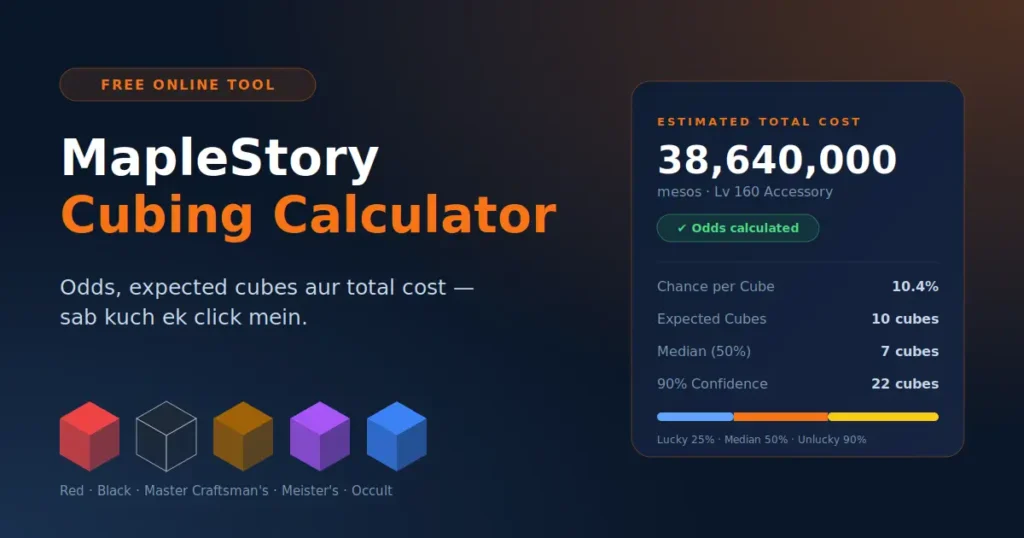
Estimate your odds, expected cube count, and expected spend to hit your dream potential lines — Red, Black, Master Craftsman's, Meister's, or Occult Cubes.
p = chance a single line is one you want · k = lines needed · 3 = lines rolled per cube
Pick your target tier, how many good lines you need, and how likely a single line is to be "good" for your build.
- Chance per Cube—
- Expected Cubes—
- Median (50%) Cubes—
- 90% Confidence Cubes—
- Cost per Cube—
- Expected Total Cost—
How many cubes (and how much it'll likely cost) to reach each confidence level.
| Confidence | Cubes Needed | Estimated Cost |
|---|
Cube costs and line-odds defaults are editable estimates — adjust them to match your server for the most accurate result.
MapleStory Cubing Calculator: Estimate Cube Odds, Costs, and Potential Results
A MapleStory Cubing Calculator helps players understand the probabilities of obtaining desired equipment potential lines, estimate the number of cubes they may need, and plan their in-game resources more effectively. Instead of relying entirely on guesswork, players can use probability calculations to make informed decisions about equipment upgrades.
At All Types Calculators, our goal is to make calculations easier to understand through practical, accessible, and informative online tools. This guide explains how a MapleStory Cubing Calculator works, how cube probabilities affect equipment upgrades, how to interpret estimated results, and how to use calculations to develop a more realistic cubing budget.
Whether you are a beginner improving your first equipment set or an experienced player optimizing endgame gear, understanding the mathematics behind cubing can help you make better decisions.
What Is a MapleStory Cubing Calculator?
A Cubing Calculator is a calculation tool designed to estimate the probability of obtaining specific potential lines when resetting equipment in MapleStory.
In MapleStory, equipment can have potential attributes that improve character performance. Depending on the equipment, game version, and available potential system, these attributes may include Strength (STR), Dexterity (DEX), Intelligence (INT), Luck (LUK), attack power, magic attack, boss damage, ignore enemy defense, item drop rate, or other useful bonuses.
Cubes or the equivalent potential-resetting mechanics can generate different combinations of attributes. Since the results are random, obtaining a particular combination may require several attempts.
A cubing calculator helps players evaluate questions such as:
- What is the probability of getting the desired potential lines?
- How many cube attempts might be needed on average?
- What is the chance of obtaining the target within a fixed number of attempts?
- How much could the process cost at a given price per cube?
- Is it more practical to keep an acceptable result or continue rerolling?
How Does the MapleStory Cubing System Work?
Before using a MapleStory Cubing Calculator, it is useful to understand the main concepts behind equipment potential.
Equipment potential
Potential is an additional set of attributes associated with eligible equipment. These attributes can improve damage, character statistics, utility, or resource farming, depending on the lines available for that item.
For example, a player might want percentage-based Strength bonuses on equipment used by a Strength-focused character. Another player might prioritize boss damage or ignore enemy defense on an appropriate weapon or secondary item. The best combination depends on your character’s class, existing equipment, progression stage, and goals.
Potential ranks
Potential systems commonly use ranks such as:
Rare: An entry-level potential rank.
Epic: A higher rank that can provide stronger options.
Unique: A more advanced rank with access to additional potential values.
Legendary: A high potential rank that can provide powerful endgame options.
Exact rank names, upgrade mechanics, and available attributes depend on the MapleStory version and regional server.
A higher rank does not automatically guarantee the ideal combination of lines. Even when equipment reaches Legendary, obtaining three desirable attributes can still require repeated attempts.
Potential lines
Equipment may have up to three potential lines, depending on its system and item configuration. Each line can contribute a different attribute or value.
For example, a hypothetical target could be:
- Line 1: STR +12%
- Line 2: STR +9%
- Line 3: STR +9%
This is an illustrative example, not a guarantee that these exact values are available for every item or game version. The probability of obtaining all three lines is different from the probability of obtaining just one desirable line. A calculator must account for the complete target condition when estimating the chance of success.
Cube types and probability tables
Different cube types may have different effects, eligible equipment, potential limits, and probability distributions. Some systems distinguish between regular potential and bonus potential. These differences matter because two cubes may not have the same chance of generating a particular attribute or upgrading potential rank.
For reliable calculations, use probability information that matches the relevant region, game version, cube type, equipment category, item level, and potential rank. Official probability disclosures should take priority over outdated community estimates whenever applicable.
How to Use a MapleStory Cubing Calculator?
The exact interface depends on the calculator, but most cubing calculators follow a similar process.
Step 1: Select your equipment
Choose the item category you want to improve, such as a weapon, hat, top, bottom, gloves, shoes, or another eligible equipment slot. Equipment category matters because different items may have different available potential lines and probability distributions.
Step 2: Enter the equipment level
Some potential options and values depend on the equipment’s level. Select the appropriate level or level range supported by the calculator. Using an incorrect equipment level can produce estimates that do not accurately reflect your item.
Step 3: Choose the potential rank
Select the equipment’s current potential rank, such as Rare, Epic, Unique, or Legendary, where supported. If the tool supports rank-up calculations, check whether it estimates only rerolls at the current rank or also includes the chance of upgrading to a higher rank.
Step 4: Select the cube type
Choose the cube or potential-resetting method that applies to your game version. Do not assume that all cube types share identical probabilities. If a calculator does not identify which probability dataset it uses, treat its results as approximate.
Step 5: Define your target lines
Specify the attributes and values you want to obtain. You may want one particular line, two matching lines, three matching lines, or a combination of different attributes. Some calculators also allow multiple acceptable combinations, which can better represent real equipment goals. For example, a player might accept either two desirable attack-related lines or a different combination that provides comparable practical value.
Step 6: Review the probability estimate
Read the estimated chance of success per attempt. If the calculator provides average cube counts, confidence thresholds, or cumulative probability charts, use those figures to compare different target conditions. Remember that the estimate depends on the assumptions and probability data used by the tool.
Step 7: Estimate your budget
If each attempt has a known cost, multiply the expected number of attempts by the cost per attempt to calculate the expected expenditure. This gives you a planning estimate, not a maximum spending limit or a promise that you will achieve the desired result within that amount.
What Factors Affect MapleStory Cubing Results?
A useful MapleStory Cubing Calculator should account for the factors that meaningfully influence the probability of obtaining a desired result.
Equipment category and level
The available potential options can vary by equipment type and level. A probability estimate for one item should not automatically be applied to another item.
Potential rank
Potential rank influences which attribute values and options may be available. A target that is possible at one rank may be unavailable or have a different probability at another rank.
Cube type
Different cubes can have different probability distributions, eligibility requirements, and rank-up mechanics. Make sure the selected cube matches your intended use.
Number and combination of target lines
A target requiring one desirable line is generally a different calculation from a target requiring three specific lines together.
The calculator should also distinguish between requiring every selected line and accepting any one of several possible combinations.
Regional game differences
MapleStory has multiple regional versions and related titles. Mechanics, item names, cube availability, and probability disclosures may differ between them.
Always confirm that the calculator is intended for the version you play.
Game updates and probability changes
Game developers may change systems, item availability, or probability tables. A calculator based on old information may no longer reflect the current game.
For this reason, probability data should be reviewed and updated when relevant game mechanics change.

Common Mistakes When Using a Cubing Calculator
Even a well-designed calculator can produce misleading results if its inputs or assumptions are misunderstood.
- Using the wrong game version: Probability tables from one regional version may not apply to another.
- Selecting the wrong equipment: Different categories can have different available options.
- Ignoring potential rank: The desired values may depend on the selected rank.
- Confusing average cost with guaranteed cost: An expected value is not a spending cap.
- Assuming every attempt improves the odds: Independent attempts do not become more favorable simply because previous attempts failed.
- Ignoring data freshness: Outdated probabilities may produce inaccurate estimates.
- Treating estimates as exact predictions: A calculator models probability; it cannot predict the random result of a future cube attempt.
Checking these details before calculating can make the results more useful and easier to interpret.
MapleStory Cubing Calculator Formula
Our MapleStory Cubing Calculator helps you estimate how many cubes you may need, your chances of getting the desired potential, and the expected cost.
Expected Cubes: 1÷Success Rate1÷Success Rate
Success Chance: 1−(1−p) n1−(1−p) n
Expected Cost: Cube Cost÷pCube Cost÷p
Total Cost: Number of Cubes×Cost per CubeNumber of Cubes×Cost per Cube
Example: If your success rate is 2% and each cube costs 20 million mesos, you can expect to need around 50 cubes, with an average cost of 1 billion mesos.
Here, pp is your success rate written as a decimal (2% = 0.02), and nn is the number of cubes you plan to use.
Remember: These formulas provide estimates, not guaranteed results. Your actual outcome may vary because each cube attempt is random.
Frequently Asked Questions
How do I calculate the number of cubes I need?
Divide 1 by your success probability. For example, if your success rate is 2% (0.02), the expected number of cubes is 1÷0.02=501÷0.02=50.
How can I calculate my cubing cost?
Multiply the number of cubes by the cost of each cube. For example, 50 cubes costing 20 million mesos each would cost 1 billion mesos.
What information do I need to calculate cubing costs?
You generally need the success probability, cost per cube, and either the number of planned attempts or the expected number of attempts.